
Meeting minutes are a formal, approved record of decisions, votes and actions; a transcript is a verbatim record of everything said. Use minutes for governance, compliance and accountability, and use a transcript when you need exact wording, evidence or accessibility support. For high-risk meetings, produce both. Tools like Minuted can generate structured minutes directly from recorded audio, which narrows the gap between the two considerably.
TL;DR:
- Meeting minutes focus on decisions, actions, and votes, while transcripts capture every word spoken without approval or editing.
- Use minutes for routine internal meetings with low legal risk, but produce transcripts alongside minutes for high-risk or formal proceedings.
- Transforming a transcript into minutes involves verifying speakers, extracting decisions, rewriting in past tense, and building an actions table for clarity and auditability.
- In high-stakes situations like board meetings or disciplinary hearings, producing both documents ensures accuracy, proof, and compliance.
- Over-formalizing routine meetings or producing hybrid documents without clarity about the audience and purpose can lead to inefficiency and legal vulnerabilities.
Table of Contents
- Meeting minutes vs transcript: what actually separates them
- When should you use minutes, a transcript, or both?
- How do you convert a transcript into approved minutes?
- What should a good minutes template and workflow include?
- Why hybrid documents are the most common mistake
- Turn recorded meetings into minutes without the manual write-up
- Sources
- FAQ
Meeting minutes vs transcript: what actually separates them
The difference between meeting minutes and a transcript is not one of quality. It is one of purpose. A transcript is a complete, word-for-word capture of what was said, by whom, and often when. Minutes are a distilled record of what was decided, built for people who need to check what happened without listening to an hour of audio.
Minutes are the operational record for decisions, votes and actions. Transcripts capture the full spoken record and serve as evidence, search material and accessibility support, according to GoTranscript's comparison of the two formats. That distinction shapes who read each document. A board member reads minutes to confirm what was resolved. A compliance officer or an employment tribunal reads a transcript to confirm exactly what was said and by whom.
Meeting notes and summaries sit somewhere between the two, and this is where most confusion starts. Notes tend to be personal, informal, and unstructured; a summary condenses a discussion into a paragraph or two without formal structure. Neither carries the approval status minutes have, and neither preserves exact wording the way a transcript does.
Where the four formats differ:
- Minutes — formal, structured, approved by attendees, records decisions and actions, rarely verbatim.
- Transcript — complete, unedited or lightly edited, captures every word spoken, timestamped, no approval step.
- Notes — informal, personal, unstructured, written for the note-taker's own reference.
- Summary — condensed narrative overview, useful for circulation but carries no formal status.
Transcripts themselves come in variants worth knowing. A verbatim transcript includes every filler word, false start and repetition. An intelligent verbatim transcript strips out the "ums" and stutters while keeping the substance and phrasing intact. Minutes-style documentation goes further still, converting speech into third-person, past-tense statements ("The board approved the budget" rather than "I think we should probably approve this budget, right?").
Picture the same five-minute exchange represented three ways. The transcript reads: "Sarah: So, um, I think we need to, you know, push the launch back. James: Yeah, I agree, maybe two weeks?" The intelligent verbatim version trims the hedging but keeps the voice. The minutes entry reads simply: "The launch date was postponed by two weeks. Decision: Sarah Chen, action owner James Reilly." One preserves nuance and tone; the other preserves the outcome. Neither is wrong, but using the wrong one for the job creates real problems, which is exactly where the next decision comes in.
When should you use minutes, a transcript, or both?
Choosing between them comes down to four questions: what's the risk if this is disputed later, who's the actual audience, do you need exact wording or searchability, and does anyone need this in an accessible format. Get the answer to those four right and the rest of the decision follows almost automatically.
Risk profile matters most. A weekly team stand-up carries almost no legal exposure, so minutes (if you even bother) can be a bullet list of actions. A board meeting, a disciplinary hearing, or a regulatory review carries genuine exposure if the record is incomplete or contested, and that's where formal minutes, and often a transcript alongside them, earn their keep.
Audience matters almost as much. Internal teams checking "what did we agree on Tuesday" want a two-minute read. Auditors, regulators or a tribunal want to see exactly what was said, in what order, by whom.
Common scenarios and the recommended artefact:
- Board or committee meeting — formal minutes, approved at the next sitting; transcript retained as backup evidence.
- HR disciplinary or grievance hearing — transcript is close to essential; minutes alone rarely satisfy an appeal process.
- Client approval or sign-off call — minutes documenting the specific approval, with timestamped transcript reference if the decision is high-value.
- Daily stand-up or internal sync — lightweight notes or an action list; full minutes are usually overkill.
- Research interview or user testing — transcript first, since exact wording and quotable phrasing is the entire point.
Before the meeting starts, ask yourself: who will read this in six months, does anyone need to quote it verbatim, is there a regulatory or contractual reason to keep an exact record, and does anyone attending need captions or a transcript for accessibility reasons. If you can't answer confidently, default to recording both. Use transcripts when exact wording, evidence, accessibility or detailed review matters, and use minutes when you need a concise, approvable record of decisions and actions, as the Unspoken blog on meeting documentation puts it plainly.
Pro Tip: If you're ever unsure which format a meeting needs, over-formalising a routine catch-up wastes time, but under-formalising a governance meeting creates real legal exposure. When in doubt, record audio and decide the output format afterwards rather than committing upfront.
How do you convert a transcript into approved minutes?
Turning a raw transcript into governance-grade minutes is a repeatable six-step process, not a rewrite job you improvise each time.
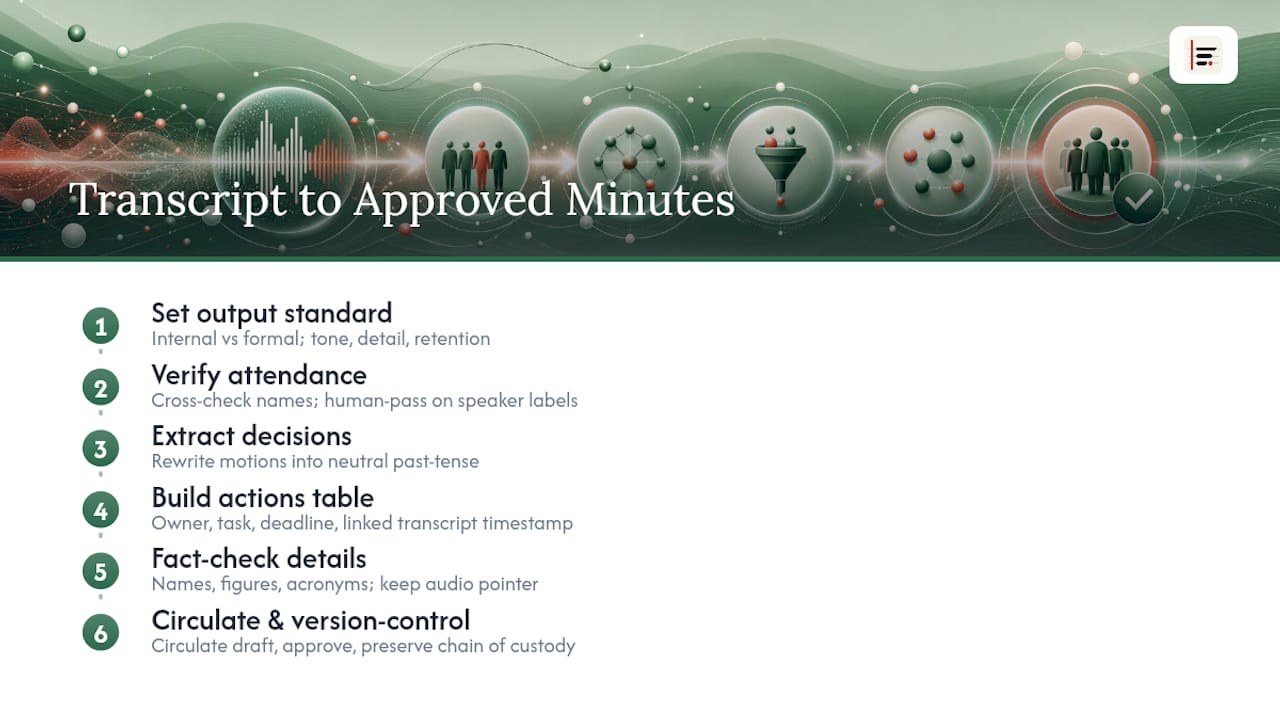
Step one: decide the output standard before you touch the text. Are these minutes for internal reference or will they be tabled at a formal board meeting? That decision affects tone, level of detail and how confidentiality and retention rules apply.
Step two: verify attendance and speaker attributions. Cross-check every name against the calendar invite or sign-in sheet. Automated speaker labelling helps here, but a human pass catches misattributed comments, particularly on calls where two people have similar voices or where someone joined late.
Step three: extract and rewrite motions and decisions in neutral, past-tense language. "I guess we're doing this" becomes "The committee approved the proposal." Strip opinion and hedging; keep the substance.
Step four: build an actions table. Every action needs an owner, a task, and a deadline, mapped to the transcript timestamp it came from, so anyone can trace a decision back to the exact moment it was made.
Step five: fact-check names, figures and acronyms. Transcripts can be used as source material to check names, figures and quotes when drafting minutes, but human review is often required to guarantee governance-grade accuracy, according to a practical transcription guide from Translators USA. Keep a pointer back to the original audio timestamp for any phrasing that's disputed later.
Step six: circulate, approve, and version control. Minutes should be circulated in draft, formally approved (usually at the start of the next meeting), and stored with clear version history. For meetings where the record might matter legally, preserve a clean chain of custody: the raw audio, the AI-generated draft, the edited version, and the signed final minutes as separate, dated files, per the guidance on meeting minutes transcription for 2026.
What should a good minutes template and workflow include?
Good minutes start with good capture. A poor recording or a chaotic introduction round costs you far more time at the editing stage than it saves during the meeting itself. Small changes at the point of capture materially reduce downstream editing time for minutes derived from transcripts, according to the same practical transcription guide: a decent microphone, a published agenda, and attendees stating their names before speaking are three of the cheapest fixes available.
A minimal minutes template needs:
- Date, time and location (or call platform)
- Attendees and apologies for absence
- Agenda items, listed in order discussed
- Decisions made against each agenda item
- Actions, with named owners and deadlines
- Date, time and format of the next meeting
Access and retention deserve a firm policy, not an afterthought. Recordings and transcripts raise real privacy, copyright and intellectual property questions, and organisations should set clear rules on who can access them and how long they're kept before storing or sharing anything, as the University of Bath's guidance on recording Teams and Zoom calls sets out. In the UK, the ICO's guidance for organisations covers the lawful basis question for recording people at all, which matters before you press record, not after. Where transcripts double as accessibility material, they should follow recognised standards for synchronised media as set out by Section508's guidance on synchronised media, so captions and transcripts genuinely serve the people who rely on them.
Three workflows cover almost every situation. Minutes-only suits routine internal meetings where no one will ever need to quote exact phrasing. Transcript-only suits research interviews, user testing, or any session where the wording itself is the deliverable. Minutes plus a transcript pack (minutes for sign-off, an actions table for execution, transcript retained as backup evidence) fits board meetings, disciplinary processes and anything with regulatory exposure, a combination GoTranscript's format guide describes as a practical middle ground for higher-risk sessions.
Why hybrid documents are the most common mistake
Most teams that struggle here aren't choosing the wrong format outright; they're producing an unhappy hybrid that tries to be both and satisfies neither. Most teams confuse notes and minutes and end up with exactly this kind of document, according to DeftBrain's comparison of minutes and notes, and the fix isn't more effort. It's asking one question before the meeting starts: who reads this, and what do they need from it.
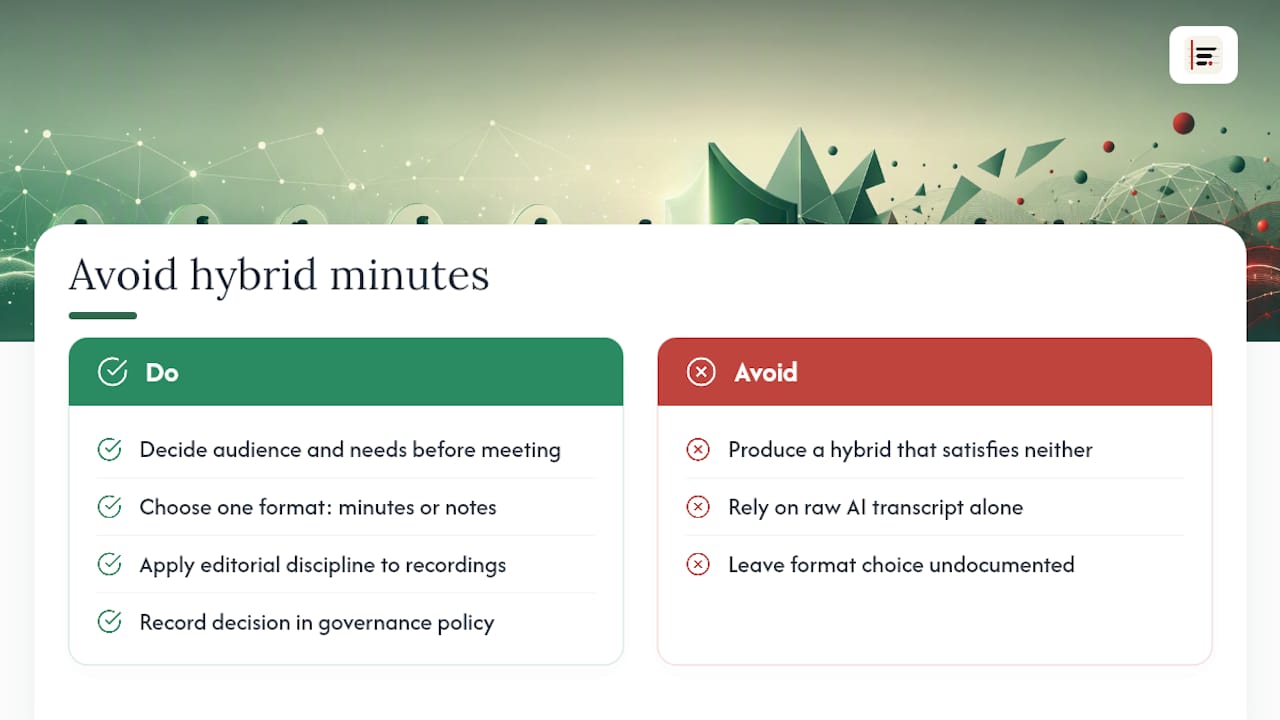
AI transcription has made raw capture nearly free, which is precisely why editorial discipline matters more now, not less. A tool can label speakers and timestamp a recording; it can't decide what belongs in a board pack versus a Slack update. That judgement call still sits with whoever writes the minutes.
If your organisation hasn't written this decision into its meeting charter or governance policy, that's the gap worth closing first, before the next disputed decision makes the choice for you.
— James
Turn recorded meetings into minutes without the manual write-up
If your team is still typing minutes from memory or scrubbing back through a recording to check who said what, that's exactly the gap Minuted closes. It transcribes audio on-device, labels speakers automatically, and turns rough notes into a structured draft you can edit into approved minutes in minutes rather than hours, all without your audio ever leaving your device unless you choose otherwise, as seen in real-world examples of IT automation.
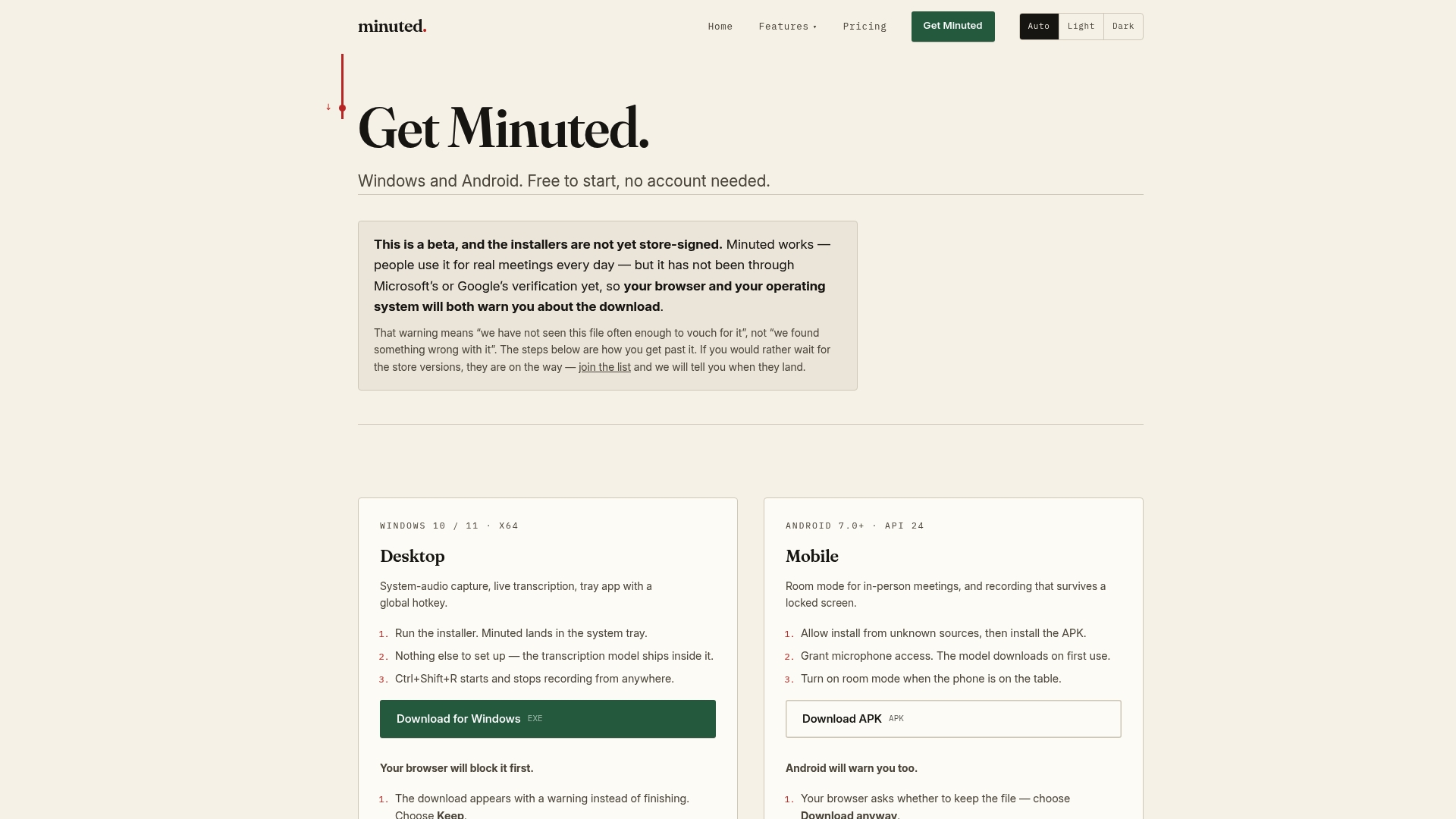
That matters most for recurring governance meetings, board packs, and client approval calls, the exact scenarios this article flags as needing a careful, auditable record. Minuted's in-person meeting capture works in the room from your phone, with the same speaker labelling and no internet connection required, and it syncs actions straight into calendar and task apps like Todoist, monday.com, and Notion, so the actions table you build while converting a transcript into minutes doesn't need re-typing anywhere. Read more about what stays on your device if privacy is the deciding factor for your organisation, and check the pricing page for the Free plan or the Pro plan at £10 per month (£110 per year) to see which fits your meeting volume.
Sources
- Minutes vs Notes vs Summary vs Transcript: Differences and When to Use Each | GoTranscript
- Why Meeting Transcripts Are Not the Same as Meeting Notes | Unspoken Blog
FAQ
What is the difference between meeting minutes and a transcript?
Minutes are a formal, approved record of decisions and actions, usually written in the third person and past tense. A transcript is a complete or near-complete word-for-word record of everything said, with no approval step and no editing for tone.
How do I convert a transcript into minutes of a meeting?
Verify attendance and speaker names, extract decisions and rewrite them in neutral past-tense language, then build an actions table linking each task to an owner, deadline and transcript timestamp. Circulate the draft for approval and store the final version alongside the source recording for auditability.
What is another name for minutes of a meeting?
Minutes are sometimes called the "minute book," "meeting record," or "official record," particularly in board and committee contexts. None of these terms refer to a verbatim transcript; they all describe the same approved, decision-focused document.
What is transcribing meeting minutes?
This phrase usually describes the process of turning a recorded or transcribed meeting into a formal minutes document, rather than transcription in the literal sense. Tools such as Minuted support this by converting recorded audio directly into a structured minutes draft with speaker labels and timestamps.
Are meeting transcripts necessary for every meeting?
No. Transcripts add real value for high-risk meetings, research interviews, or anywhere accessibility or exact wording matters, but a routine internal sync rarely needs one. Reserve full transcripts for meetings where the wording itself could be disputed or referenced later.