
A meeting decision log is a running record of what your team decided, why, and who owns the outcome, kept separate from ordinary meeting notes. Its main benefit is simple: nobody has to reconstruct a decision from memory three months later. Project teams use it to onboard new joiners fast, settle disputes, and prove, if asked, exactly how a call was made.
TL;DR:
- Keeping decision logs simple with around six fields ensures team adoption and easy maintenance, especially for small teams with few decisions per month.
- Logging decisions immediately during or after meetings with a designated owner maintains accuracy and prevents reliance on memory or reconstruction later.
- Linking decisions to agenda items and follow-up action tickets enables clear traceability from initial decision to implementation and review.
- Using restricted or separate logs for sensitive decisions protects confidentiality while maintaining an audit trail for governance purposes.
- Automating transcript and integration workflows, such as with tools like Minuted, significantly reduces effort and improves the accuracy and privacy of decision documentation.
Table of Contents
- What is a meeting decision log, exactly?
- What should go in each decision log entry?
- Who should own decision log entries, and how should teams keep them updated?
- Where should you actually store the decision log?
- How transcription and integrations cut the friction of logging decisions
- How do you link decisions to agendas and action items?
- How should you handle sensitive or confidential decisions?
- Practical rules of thumb for keeping the log alive
- How Minuted takes the effort out of populating your decision log
- Sources
- FAQ
What is a meeting decision log, exactly?
A decision log is a structured, centralised record that captures what was decided, why it was decided, and who made the call. That's a narrower job than meeting minutes, which try to capture everything discussed, and a lighter job than an Architecture Decision Record (ADR), which documents deep technical trade-offs in full.
Think of it as one row per decision, not one block per meeting. Meeting minutes are chronological; a decision log is a database. You'd log a decision to switch a supplier, delay a launch, or change a pricing tier in one row. You'd reach for an ADR when the decision is genuinely technical and needs a fuller record of the architecture options weighed, not just the outcome.
Most operational and product decisions belong in the log. Save ADRs for engineering choices with long-term consequences, like picking a database or a deployment model, where future engineers need the full reasoning trail, not a summary.
The payoff shows up gradually. New team members read the log instead of asking "why did we do it this way?" in every second meeting. Disagreements about "didn't we already decide this?" get resolved by scrolling, not arguing. And when something goes wrong six months later, you have an audit trail that shows the decision was reasonable given what was known at the time.
What should go in each decision log entry?
Keep the field list short. A minimal decision log works well with around six columns: date, topic, options considered, what you chose, what you rejected, and why. Adding more fields than that raises the effort per entry, and effort is exactly what kills adoption.
For most teams, the practical set looks like this:
- Date — when the decision was made, not when it was written up
- Topic or title — a short label so the entry is searchable later
- Decision — one clear sentence stating what was decided
- Options considered — the alternatives that were on the table
- Rationale — two to four sentences on why this option won
- Owner — the single person accountable for the outcome
- Impact level — low, medium or high, so reviewers can prioritise
- Review date — when to revisit, particularly for anything time-sensitive
- Links — related tickets, documents, or the ADR if one exists
A short rationale of two to four sentences is usually enough for anyone reading it later. Longer explanations belong in a linked ADR, not in the log itself.
Here's the difference between a vague entry and a useful one. Vague: "Decided to go with Vendor B." Useful: "Chose Vendor B over Vendor A and C because delivery lead time was 40% shorter and the contract allowed monthly cancellation. Vendor A was cheaper but locked us into a 12-month term."
A copy-ready sample row:
| Date | Topic | Decision | Options Considered | Rationale | Owner | Impact | Review Date |
|---|---|---|---|---|---|---|---|
| 12 March 2026 | Q2 pricing tier | Move mid-tier customers to annual billing only | Keep monthly billing / offer both / annual only | Annual billing cuts churn admin and matches renewal cadence with our biggest competitor cohort; monthly option was rarely used | Priya (Revenue) | Medium | 12 September 2026 |
Paste that row structure straight into a spreadsheet, a Notion database, or a Markdown table and you have a working log by the end of the meeting.
Who should own decision log entries, and how should teams keep them updated?
The person who owns the decision, or the meeting facilitator if ownership is unclear, should write the entry. Nobody else should be filling in someone else's decision after the fact.
The moment to write it is during the meeting or immediately after, while the reasoning is still fresh. Logging decisions as they happen, rather than reconstructing them from memory the next day, keeps the rationale accurate and always attaches a named owner for follow-up.
A quick checklist per entry keeps quality consistent:
- Write one clear sentence stating the decision itself, no ambiguity.
- Add the rationale in two to four sentences, referencing the alternatives you rejected.
- Name a single owner, not a team or a department.
- Set a review date, especially for anything with a medium or high impact rating.
- Link related tickets, documents, or an ADR if the decision warrants one.
On cadence, reviewing the log at least quarterly, or whenever the underlying assumptions change, keeps it trustworthy. When a decision no longer holds, mark it deprecated and link to whatever replaced it rather than deleting the row. Deleting erases the history that made the log worth keeping.
Pro Tip: Add "update the decision log" as the final agenda item in every meeting invite. Once it's part of the close-out ritual, people stop treating it as optional admin.
Where should you actually store the decision log?
The right tool depends on team size and how often decisions need to connect to other work, not on which platform looks most impressive.
- Lightweight formats — a shared spreadsheet or a Markdown file in your repository. Fast to set up, zero learning curve, but weak on filtering once you pass a few dozen entries.
- Team wikis and databases — Notion-style templates with database filters suit teams that need to tag decisions by department, filter by impact level, or link rows to other pages. Confluence-style wikis work similarly for teams already living there.
- Dedicated decision-tracking tools — purpose-built trackers capture options, rationale, and impact level in structured fields and can export a formatted log for stakeholders who never touch the source tool.
Weigh three questions before picking one: how many decisions does your team make per month, does the log need to link directly to tickets or code, and who actually needs to search it later. A five-person team making a handful of calls a month doesn't need a database with custom fields. A 40-person product organisation making dozens probably does.
How transcription and integrations cut the friction of logging decisions
The biggest reason decision logs die isn't lack of value. It's the effort of capturing them accurately in the moment. Accurate transcripts with speaker labelling make it far easier to write a precise rationale and confirm exactly who committed to owning the outcome, rather than guessing after the meeting who said what.
On-device processing matters here too, particularly for rationale that touches pricing, personnel, or strategy readers shouldn't see circulating on a server somewhere. And when transcripts sit next to calendar and task integrations, the gap between making a decision and logging it shrinks, because the meeting record and the follow-up task are already sitting in the same place.
How do you link decisions to agendas and action items?
A decision without context is just an opinion in a spreadsheet. Link each entry back to the meeting agenda item that prompted it and forward to any action item it created, so anyone reading the log later can trace the full arc: what was on the table, what got decided, and what happened next.
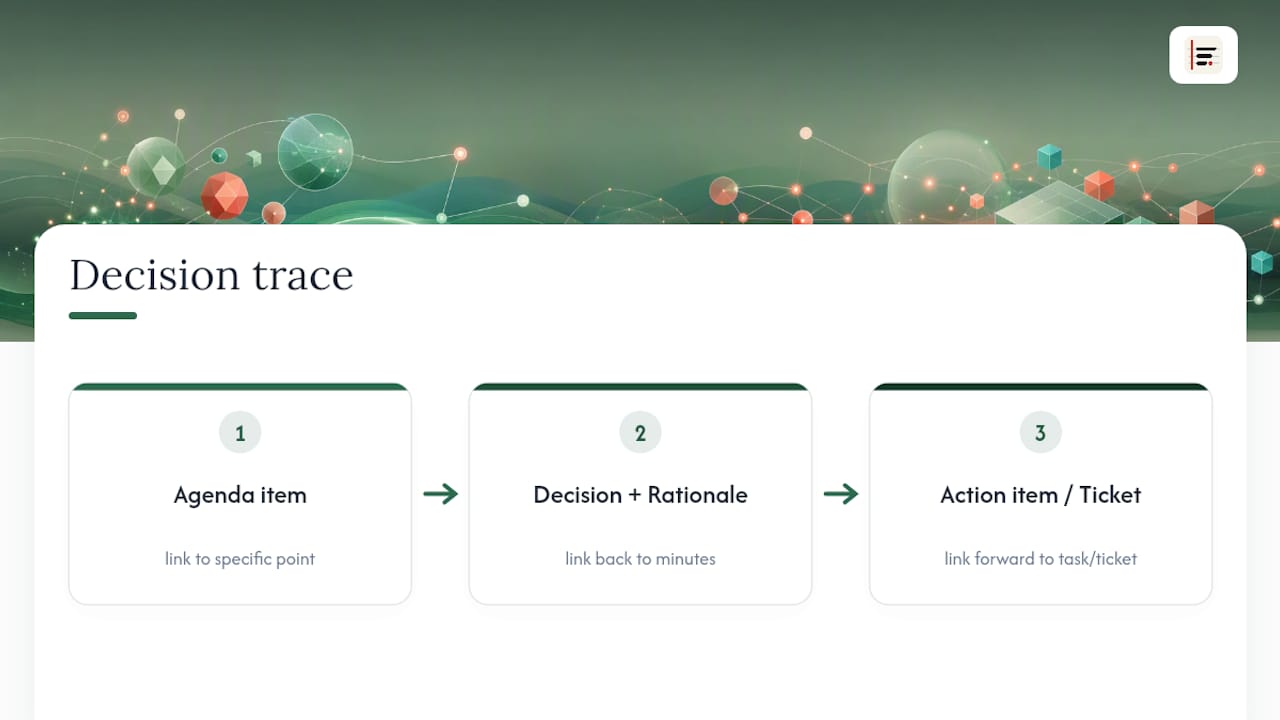
Practically, that means each decision row should carry a link or reference to the specific agenda point (not just "the March 12 meeting") and a link to the resulting task in whatever system your team uses for action items, whether that's a project board, a ticketing tool, or a simple task list. If your process already produces a meeting minutes document that includes attendees, decisions and action items with owners and deadlines, the decision log doesn't need to duplicate that detail. It just needs a link back to it.
This pays off most during audits and follow-up meetings. Instead of asking "what did we agree here?" a project manager can open the log, follow the link to the agenda, see the rationale, then follow the link forward to check whether the action item actually got done. Teams that automate this handoff, turning a logged decision straight into a tracked ticket, tend to close the loop faster than teams relying on someone to manually copy it across. A tool that auto-creates tickets from meeting outcomes removes that manual step entirely for engineering-heavy teams.
How should you handle sensitive or confidential decisions?
Not every decision belongs in a log that the whole company can read. Personnel matters, commercially sensitive pricing, and legal disputes need the same discipline applied to logging, just with tighter access.
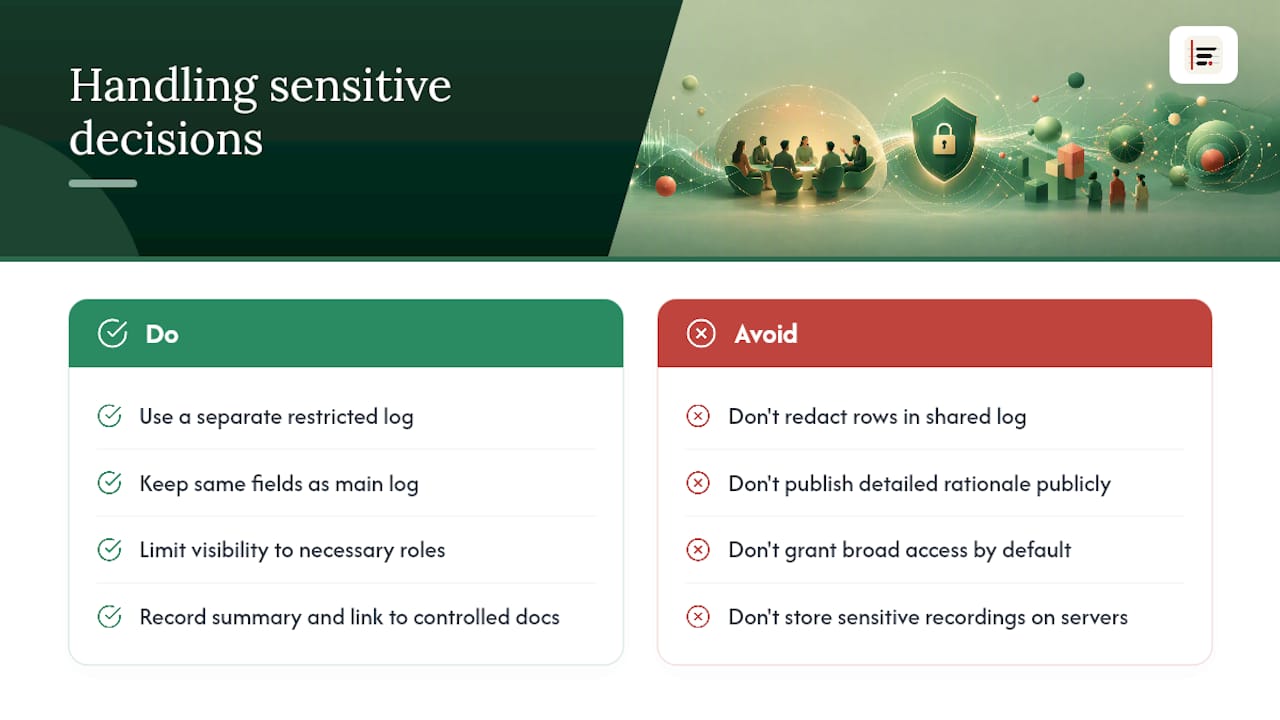
The simplest approach is a separate, restricted decision log rather than a redacted version of the main one. Give it the same fields, date, decision, rationale, owner, review date, but limit visibility to the people who genuinely need it: HR, legal, or senior leadership, depending on the topic. Redacting individual rows in a shared log tends to create confusion about what's missing and why, and it invites people to ask questions you were trying to avoid.
Where a sensitive decision does need to be visible at a summary level, log the fact that a decision was made and who owns it, but keep the detailed rationale in a linked, access-controlled document rather than the shared row itself. That keeps the audit trail intact for governance purposes without exposing detail that shouldn't circulate widely. Boards handling governance decisions often solve this with tightly scoped reporting formats built around a handful of pointed questions rather than a full narrative, a pattern worth borrowing for board-level decision reporting generally.
On-device processing helps here too: if the discussion itself was sensitive, keeping the source recording off any server reduces one more place that information could leak before it ever reaches the log.
Practical rules of thumb for keeping the log alive
Three rules do most of the work: give every decision a single named owner, keep the rationale short but specific rather than vague, and log low-impact decisions too, not just the big ones, because that's what makes logging a habit rather than an event.
Resistance usually comes from friction, not disagreement with the idea. Embed the template directly in the meeting invite and make the final agenda item "update the log." Teams that do this consistently stop treating it as extra work.
— James
How Minuted takes the effort out of populating your decision log
Filling in a decision log usually stalls at the rationale field, because nobody wants to reconstruct a two-sentence justification from memory an hour after the meeting ends. Minuted solves that specific problem: it turns meeting audio into a structured, speaker-labelled transcript as the meeting happens, so the rationale field can be written straight from what was actually said, not a fuzzy recollection.
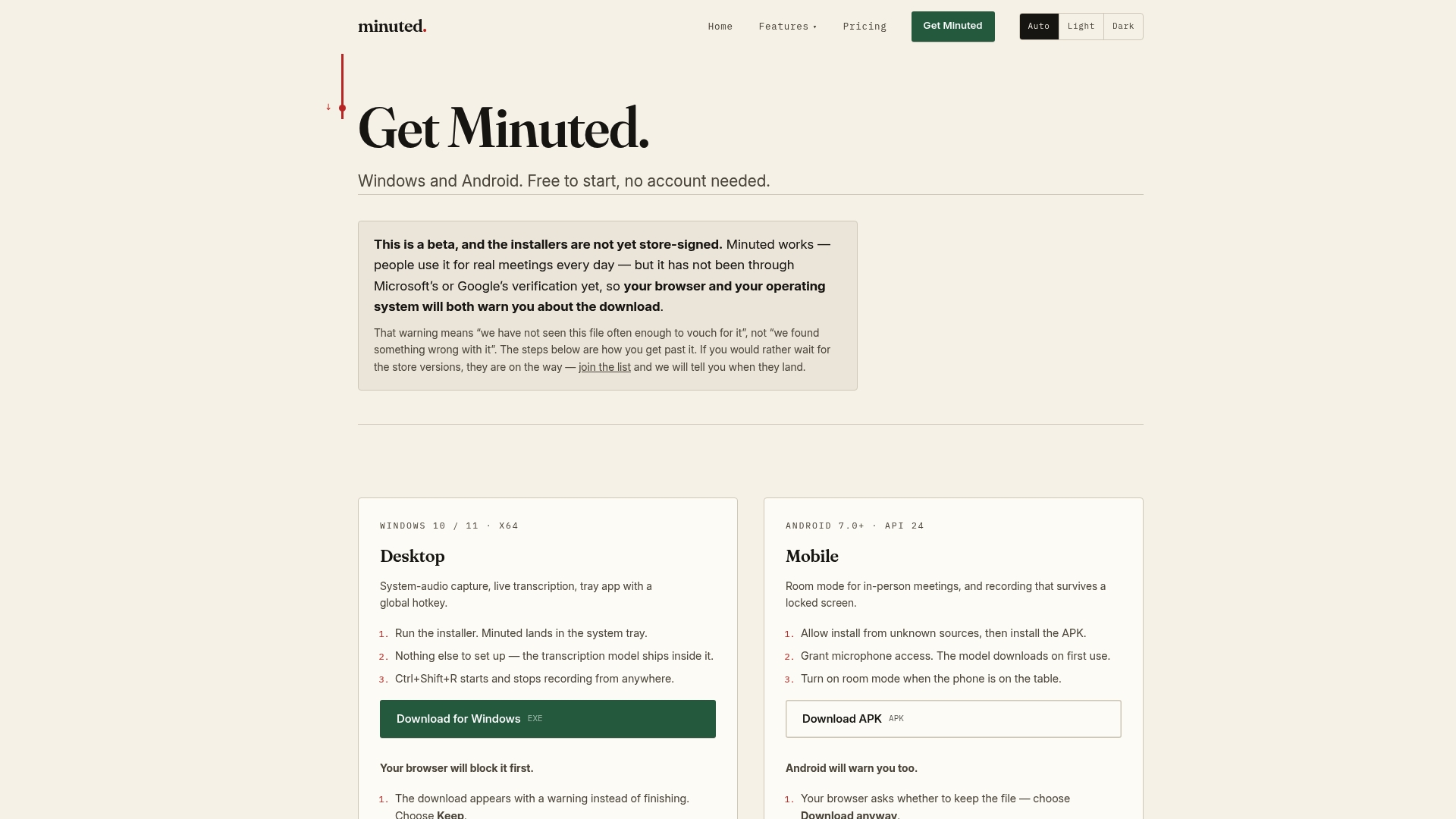
Speaker labelling also settles the "who owns this" question without a follow-up message asking who volunteered. Because Minuted processes audio on-device, sensitive rationale, the kind that shouldn't leave the room, stays private; you can see exactly what leaves your device and what doesn't before you trust it with anything confidential. Its calendar and task integrations then let you attach a decision straight to the agenda item that prompted it and the task it created, closing the loop the moment the meeting ends rather than days later. If your team is still copying decisions into a log from memory, try Minuted on your next meeting and see how much of that rationale field writes itself.
Sources
A few sources are worth keeping on hand while you set your log up. The Confluence meeting notes template covers the attendees and action-item structure that pairs well with a decision log. The WhyChose decision log template gives a free, copy-paste six-column layout. The Notion decision log template suits teams wanting database filters, and DecTrack's explainer covers review cadence and deprecation practice in more depth.
- Decision Log Template (Free, Copy-Paste) — WhyChose
- What Is A Decision Log? The Essential Tool For Project Managers
FAQ
What should be in a decision log?
At minimum: the date, a topic label, the decision itself, the options considered, a short rationale, a named owner, an impact level, and a review date.
What is the 10/10/10 rule for decisions?
It's a decision-weighing exercise, not a decision log field: it asks how you'll feel about a choice shortly, in the medium term, and in the long term to test whether it's driven by short-term emotion or genuine long-term reasoning.
What is a decision log?
A decision log is a structured, centralised record of what was decided, why, and who owns it, kept as one row per decision rather than a chronological meeting summary.
How do I create a decision log?
Start with a spreadsheet or Markdown table using the minimal field set, assign a single owner to every entry, and write the rationale during or immediately after the meeting, ideally from an accurate transcript rather than memory using a tool like Minuted.