
Focus group transcription for internal meetings should produce a searchable, speaker-labelled transcript alongside concise, agenda-based minutes and clear action items. The recommended approach pairs privacy-first, on-device processing with a short human review before anything gets circulated. Done properly, this turns an hour-long workshop into a document your team can act on within minutes, not days. Some tools are built specifically around that on-device, human-verified workflow.
TL;DR:
- On-device transcription offers higher privacy by processing audio locally and is ideal for sensitive meetings like strategy sessions, HR interviews, and executive briefings.
- Achieving accurate speaker labels requires participant name acknowledgment at the start and consistent seating; voice profiles improve accuracy over recurring meetings.
- Human QA should review transcripts within a day to correct key details such as decisions, deadlines, and speaker attributions, minimizing errors before circulation.
- Transcripts must be structured with agenda-aligned headings, decision summaries, and action item tables to be truly useful for quick review and task execution.
- Clear consent, proper retention policies, and exclusion of legal or highly sensitive discussions from transcription are critical to manage legal risks and compliance.
Table of Contents
- What should a usable meeting transcription contain?
- Privacy and legal checklist before you record
- How to turn a raw transcript into clear minutes
- How accurate is AI transcription, and when does it need a human check?
- Workflow and integrations that speed up post-meeting work
- When does on-device transcription make the most sense?
- How do you keep speaker identification accurate?
- What does a proper quality assurance pass look like after transcription?
- What legal considerations apply to internal meeting data?
- What's the best way to capture clean focus group and workshop audio?
- Why is overlapping speech still the hardest problem in transcription?
- Which tools suit meeting-focused transcription work?
- Governance beats good intentions
- Try Minuted for your next internal meeting
- Primary sources for further reading
- Sources
- FAQ
What should a usable meeting transcription contain?
A transcript on its own is not a deliverable. It's raw material. What makes it usable is structure: the ability to search a specific phrase, know who said it, and see how the conversation mapped onto your original agenda.
At minimum, a transcription worth keeping should include:
- Searchable text with timestamps so you can jump to the exact moment a decision was made
- Speaker labels distinguishing who raised a point, who objected, and who made the final call
- Agenda-aligned headings rather than a flat wall of dialogue in the order it happened
- A short decisions section separated from general discussion, so it doesn't get buried
- Action items broken into owner, task, and deadline rather than a vague list of "things to do"
Output format matters more than most teams assume. A reliable minutes template captures attendees, agenda-based notes, decisions, and action ownership in a structure that reduces ambiguity later. For handoff, Markdown and DOCX both work well: Markdown is lighter and plays nicely with knowledge tools and AI systems, while DOCX suits teams who still route documents through formal approval chains. Whichever you choose, consistency across meetings matters more than the format itself.
Privacy and legal checklist before you record
Before a single recording starts, work through these questions. Skipping this step is the most common way teams turn a useful transcript into a liability.
- Get consent first. Follow your jurisdiction's standard, and note that a recorded verbal opt-in is generally acceptable if you can point to it later.
- Choose processing location deliberately. On-device processing avoids sending audio to third-party cloud servers, which reduces legal and operational exposure, particularly for multinational teams juggling different data protection regimes.
- Rule out certain meetings entirely. Legal counsel briefings, sensitive HR investigations, and live M&A discussions are poor candidates for any transcription, AI-assisted or otherwise.
- Label raw outputs as drafts. Mark unedited AI transcripts clearly before they circulate, and don't let them auto-distribute to a wider list than the meeting itself warranted.
- Set a retention and deletion policy. Decide upfront how long transcripts live and who can access them, because AI-generated records can increase what's discoverable in litigation if left unmanaged.
Pro Tip: Build your consent line into the calendar invite itself ("this meeting will be recorded for internal minutes; let the organiser know if you object") rather than announcing it awkwardly at the start of the call.
Consent and governance aren't box-ticking exercises. Adoption of AI note-taking has already produced litigation risk in real workplaces, which is reason enough to write the policy down rather than leave it to individual judgement.
How to turn a raw transcript into clear minutes
A transcript follows the conversation. Minutes should follow the agenda, which usually means reordering the material rather than reading top to bottom.
Start by mapping the transcript against your original agenda items, then work through each one with a consistent structure:
- Key facts discussed — what information was on the table
- Options considered — what alternatives came up, even briefly
- The final decision, clearly labelled as such rather than buried in discussion
- A short rationale — one or two lines on why that option won
Keep verbatim quotes rare. A practitioner-recommended structure favours motions, votes, and decisions with concise rationale over word-for-word exchanges, which also limits legal exposure if the minutes are ever reviewed externally. Objective summaries protect everyone involved better than a transcript-style record of who said exactly what.
Extract action items separately, ideally as a small table:
| Action | Owner | Deadline |
|---|---|---|
| Draft revised budget | Priya | Friday |
| Confirm vendor contract terms | Tom | Next Wednesday |
A 5–10 minute human QA pass after the meeting resolves most errors that would otherwise creep into this stage, particularly around who owns what.
Use Markdown with H2s for each agenda topic if you plan to feed these minutes into a knowledge base or an AI summarisation tool later. Structured text parses far more cleanly than a formatted Word document, for both humans skimming quickly and software processing it downstream.
How accurate is AI transcription, and when does it need a human check?
Modern speech-to-text models perform very well under good conditions. On clean audio with a single speaker and clear diction, accuracy commonly falls in the 95 to 99% range. That figure drops meaningfully once you introduce background noise, heavy accents, overlapping speech, or dense technical jargon specific to your industry.
Because of that variability, treat every AI-generated transcript as a draft until someone has checked it. A short QA routine covers most of what matters:
- Confirm speaker labels are attributed to the right person, especially after any pause or interruption
- Validate the wording of recorded decisions against what was actually agreed
- Check deadlines, figures, and names for transcription slips, which are the most common error type
- Spot-check any section with crosstalk or multiple people speaking at once
For anything with legal weight, such as a formal board resolution or a regulatory disclosure discussion, commission a verbatim human transcription or a legal-grade service instead of relying on AI output alone.
Workflow and integrations that speed up post-meeting work
The value of a transcript multiplies once it's connected to the tools your team already lives in, rather than sitting as a standalone file nobody opens again.
Attach the transcript directly to the calendar event it came from, so anyone reviewing the meeting later finds the record without hunting through folders. From there:
- Auto-extract action items into task tools such as Todoist, monday.com, or Notion, or use a paste-ready template if you're not automating that step yet
- Use click-to-play transcripts so reviewers can jump straight to the audio moment behind a disputed line, rather than trusting the text blind
- Export in Markdown when the transcript is destined for an LLM or internal knowledge system, since structured text with topic headings reduces token overhead and improves parsing compared with an unformatted block of dialogue
Pro Tip: If you run the same recurring meeting weekly, build one Notion or monday.com template once and route every transcript's action items into it automatically. The time saved compounds fast over a quarter.
Tools built for capturing decisions as they happen, such as Betlog, follow a similar logic: keeping a clean record at the point of decision beats reconstructing it from memory afterwards.
When does on-device transcription make the most sense?
On-device processing suits any meeting where the content shouldn't leave your organisation's control. That's a wider category than most teams initially assume.
Strong candidates include:
- Internal strategy sessions and product roadmap discussions
- HR pre-screens and early-stage candidate conversations
- Executive updates and board support material, subject to your organisation's own charter rules
- Cross-border team meetings, where processing audio locally avoids the added complexity of international data transfer rules
Speaker labelling and calendar or task integrations shorten the distance between "meeting ends" and "minutes delivered," which matters most for teams running several meetings a week. Minuted processes audio in real time on-device, labels speakers automatically, and outputs structured minutes that sync with calendar and task tools, which covers most of what internal, sensitive meetings actually need.
How do you keep speaker identification accurate?
Speaker mislabelling is one of the most common frustrations with AI transcripts, and it usually traces back to how the recording was set up rather than a flaw in the software itself.
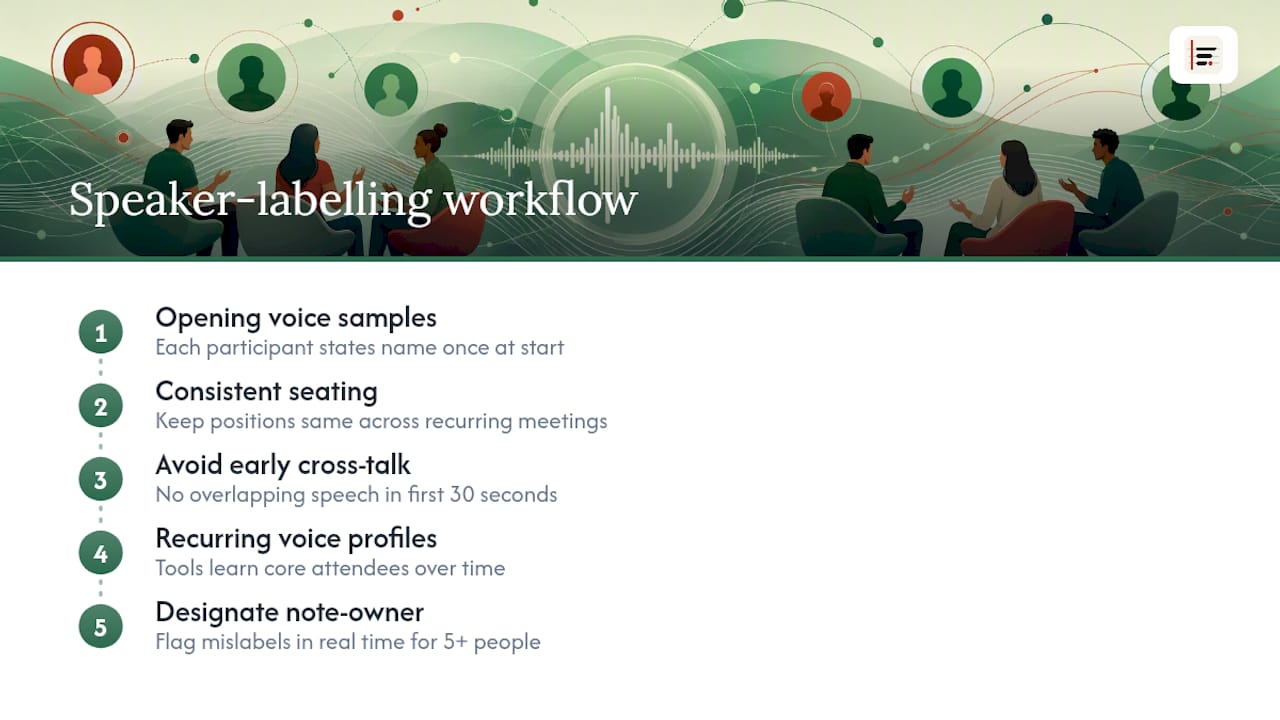
A few habits meaningfully improve labelling accuracy. Ask each participant to state their name once at the start of the recording, which gives the system (and any human reviewer) a clean voice sample to anchor against. Keep seating consistent if the same group meets repeatedly, since voice-to-position mapping helps when reviewing audio later. Avoid multiple people speaking over each other in the first thirty seconds, when the system is still calibrating who's who.
For recurring meetings with the same core attendees, tools that support voice-profile recognition improve over time as they encounter the same speakers repeatedly. This matters more for team meetings and workshops than for one-off calls with strangers, where every session starts from zero.
If your room has more than four or five speakers, assign a designated note-owner whose job is to flag, in real time or immediately after, any moment where the transcript's labelling looks wrong. That single habit catches more errors than any automated fix, because a human in the room knows the voices better than any model trained on general speech patterns. Speaker count is the single biggest driver of labelling difficulty. Two people rarely get confused for each other; six people in a small room with cross-talk is a genuinely harder problem for any transcription engine, human or machine.
What does a proper quality assurance pass look like after transcription?
Treat the QA step as non-negotiable rather than optional polish, because it's the difference between a transcript and a record you can rely on.
Run through this sequence within a day of the meeting, while details are still fresh:
- Read the decisions section first. If a decision is recorded ambiguously, or contradicts what you remember being agreed, fix it before circulating anything.
- Check every deadline and figure. Numbers and dates are the highest-stakes errors, since a wrong date on an action item can cascade into missed deliverables.
- Verify speaker attribution on contested points. Anywhere the transcript records a strong opinion or objection, confirm the right person is credited.
- Scan for jargon-driven errors. Industry-specific terms and acronyms are where speech-to-text models most often substitute a similar-sounding but wrong word.
This routine typically takes five to ten minutes and resolves the majority of errors that would otherwise affect a decision record. It's a small cost against the risk of a wrong deadline or a misattributed quote circulating as fact. Assign this task to the same person each time, ideally the meeting owner, so accountability for accuracy doesn't drift between whoever happens to be free.
What legal considerations apply to internal meeting data?
Recording and transcribing an internal meeting creates a document that didn't exist before, and that document carries its own legal weight once it's written down.
The most immediate consideration is consent. Recording without a clear opt-in, even for an internal team meeting, has already produced real litigation exposure for organisations using AI note-taking tools. The safest habit is building consent into the invite itself rather than treating it as a verbal afterthought.
The second consideration is discoverability. A transcript is a record, and records can be requested in litigation, regulatory enquiries, or internal investigations. Legal commentary on AI transcription warns that increased machine-generated documentation raises discovery obligations that didn't exist when meetings simply went unrecorded. That's precisely why retention policy matters as much as accuracy: a well-labelled transcript kept for three years under a clear policy is a manageable asset; an unmanaged pile of raw recordings kept indefinitely is a liability waiting to surface.
Finally, treat privilege carefully. Any meeting involving legal counsel, active disputes, or matters where privilege might apply should generally be excluded from AI transcription entirely, regardless of how convenient it would be to have a searchable record.
What's the best way to capture clean focus group and workshop audio?
Good transcription starts with good audio capture, and most accuracy problems trace back to the recording setup rather than the software processing it afterwards.
Position a microphone centrally rather than near whoever is facilitating, since facilitators tend to talk more but matter less for capturing the room's actual input. In a workshop or focused session with several participants, a single laptop microphone rarely covers the room evenly. If budget allows, an external omnidirectional microphone placed on the table captures far more evenly than a built-in device microphone positioned at one end.

Seat participants facing each other rather than in a line, which naturally reduces the tendency for people to speak over one another mid-sentence. Ask participants to pause briefly before responding to someone else's point, a small habit that dramatically improves speaker separation in the resulting transcript. Close windows and switch off air conditioning units where practical, since consistent background noise degrades accuracy more than a single loud interruption.
If you're running a hybrid session with remote attendees, route their audio through a dedicated feed rather than relying on room microphones to pick up a speakerphone, which tends to produce muffled, hard-to-parse audio for that participant specifically.
Why is overlapping speech still the hardest problem in transcription?
Multiple speakers talking at once remains the single biggest technical challenge in meeting transcription, and no amount of software sophistication fully solves it.
The core issue is straightforward: when two voices overlap, a transcription engine has to guess which words belong to which speaker, and it frequently guesses wrong. This matters most in exactly the sessions where it's most likely to happen, animated workshops and group discussions where people naturally interrupt or finish each other's sentences.
A few practical patterns reduce the damage:
- Establish a light facilitation norm ("one voice at a time") at the start of any multi-person session, without making it feel like a formal rule
- Expect and accept that heated or fast-moving discussion segments will need extra human review, rather than assuming the whole transcript is equally reliable
- Flag timestamps where crosstalk is heaviest during your own listening, so the reviewer knows exactly where to focus attention rather than scanning the whole document
Accents and unfamiliar jargon compound the problem further, since a model already working hard to separate two overlapping voices is more likely to substitute a wrong word when the vocabulary itself is unfamiliar. None of this means the technology isn't useful. It means the QA step described earlier isn't optional for sessions with more than two or three participants talking freely.
Which tools suit meeting-focused transcription work?
The right tool depends heavily on where your priorities sit: pure accuracy on clean single-speaker audio, privacy for sensitive internal content, or integration with the task systems your team already uses.
For teams whose core concern is keeping meeting content off third-party servers, on-device processing tools such as Minuted handle transcription locally and support both a fully local mode and cloud-based AI write-up when more processing power is wanted for longer sessions. Speaker labelling, calendar syncing, and task integrations with systems like Todoist, monday.com, and Notion matter more for recurring internal meetings than raw transcription speed alone.
For teams working primarily with recorded audio after the fact rather than live capture, general-purpose transcription software focused on batch accuracy may suit better, though it often means uploading audio to cloud infrastructure, which reintroduces the privacy trade-offs covered earlier.
Whichever category fits your team, evaluate any option against three practical questions: where does the audio actually get processed, how easily do outputs convert into structured minutes rather than raw text, and how much manual copying is required to get action items into the task tool you already run.
Governance beats good intentions
Most teams don't fail at transcription because the technology is unreliable. They fail because nobody wrote down who's responsible for reviewing the output before it gets treated as fact.
Adopt a short written policy: designate a meeting owner for every recorded session, require that person to run the human QA pass before minutes go out, and state clearly which meeting types are off-limits for AI transcription entirely. Pilot the approach on recurring, low-risk meetings first, weekly team standups rather than board sessions, and track how much time it actually saves before rolling it out wider. Train people on consent and distribution early, because the biggest risks come from good tools used carelessly, not from bad tools used carefully.
— James
Try Minuted for your next internal meeting
Some transcription solutions are built specifically around the workflow described here: on-device, real-time transcription that keeps audio on the device, paired with speaker labelling and structured minutes output. For internal strategy sessions, HR pre-screens, or recurring team workshops, that combination means you get a searchable transcript and clean action items without the privacy trade-offs of cloud-first tools.
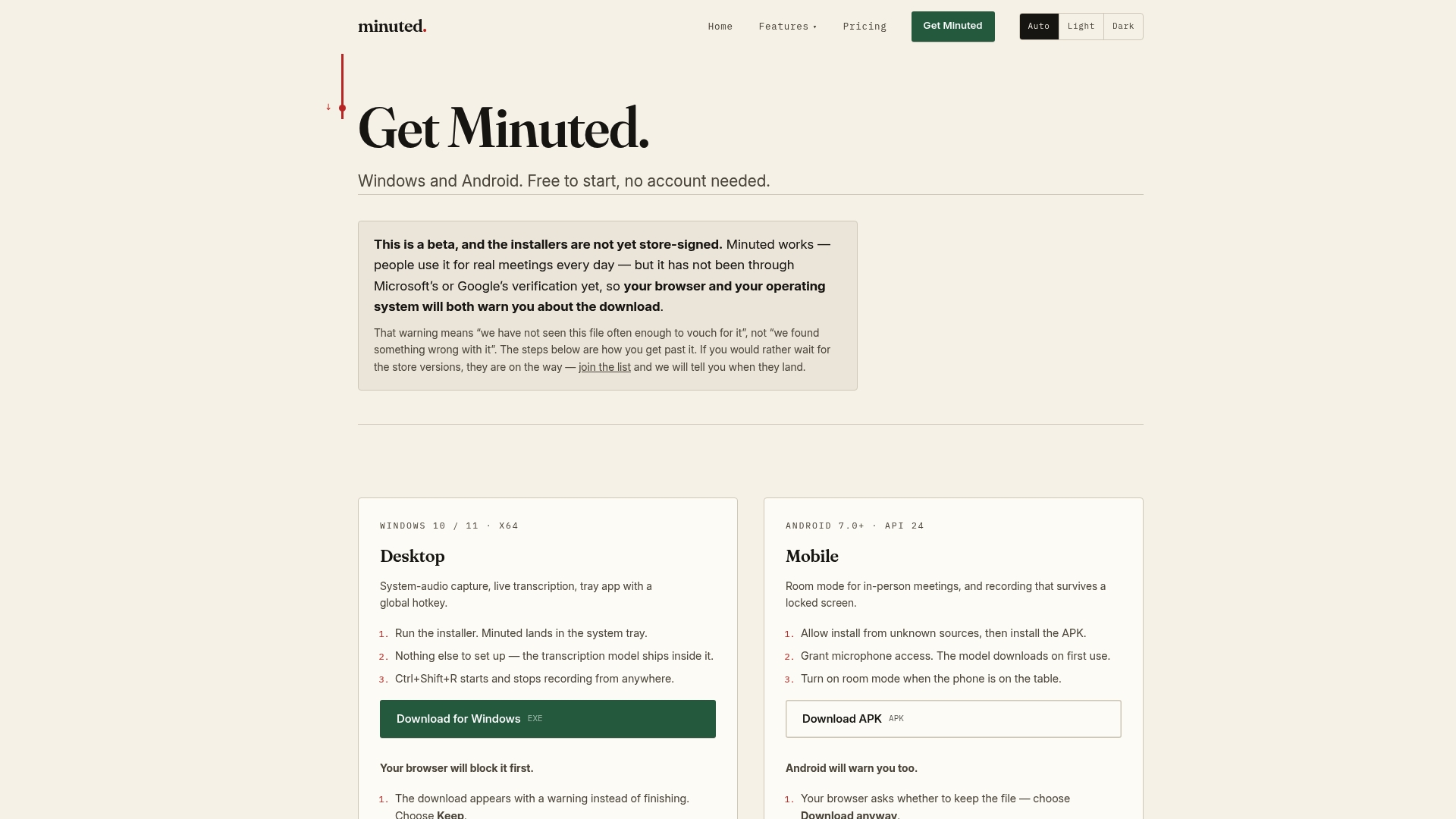
Calendar and task integrations with systems like Google, Outlook, Todoist, monday.com, and Notion help action items land where teams already work, rather than sitting in a document nobody reopens. The local mode is free and unlimited, so the simplest next step is to test it on a low-stakes, non-sensitive meeting with participant consent and see how the output compares with your current note-taking process. If cloud processing minutes or deeper integrations matter for your team's volume, the features page and pricing page lay out what's included at each tier. For a closer look at exactly what data stays on your device versus what any cloud step touches, Minuted's privacy breakdown walks through it directly.
Primary sources for further reading
- AI Transcription: Opportunities, Risks and Mitigants — Goodwin
- AI transcription opportunities, risks and mitigants — Mondaq
- Effective meeting notes template — Legal Clarity
- Meeting notes tips — Asana
Sources
- AI Transcription—opportunities, Risks And Mitigants | Goodwin
- AI transcription opportunities, risks and mitigants — Mondaq
- Effective meeting notes template — Legal Clarity
- Why meeting notes are always incomplete, and how AI fixes it — mdisbetter
FAQ
What is focus group transcription for internal meetings?
It's the process of converting recorded workshop or team meeting audio into a searchable transcript with speaker labels, then structuring that into agenda-based minutes with clear decisions and action items.
Is on-device transcription more private than cloud-based tools?
Yes. On-device processing keeps audio on the recording device rather than sending it to third-party servers, which reduces cross-border transfer risk and third-party exposure for sensitive content.
How accurate is AI meeting transcription?
On clean audio with minimal overlap, accuracy commonly reaches 95 to 99%, though noise, accents, and crosstalk lower that meaningfully, which is why a short human review step still matters.
Do I need consent to record an internal meeting?
Generally yes, following your jurisdiction's consent standard, and a recorded verbal opt-in typically satisfies that requirement if documented at the start of the session.
Can Minuted transcribe meetings without an internet connection?
Yes. Minuted processes audio on-device in real time, meaning it can transcribe and label speakers without requiring an internet connection, then export structured minutes once you're ready to review them.